О нас
Durmapress specializes in designing, manufacturing, and selling various metal processing equipment, including bending machines, shears, punches, and laser cutting machines. The company was founded in 2014, with years of experience and technology accumulation. DurmaPress has become one of the well-known brands in China's metal processing machinery industry.

Свяжитесь с нами
Последние сообщения
Категории
Следуйте за нами
Еженедельное новое видео
Оглавление
Two fiber laser cutting machines can share almost identical datasheets and still perform very differently in your shop. One holds tolerance through an eight-hour shift; the other drifts. One cuts your parts in 40 minutes; the other takes 55 because of how it handles small holes and pierces.
That gap is why comparing kilowatts and prices is the wrong place to start. Undersize the machine and you lose contracts and fight edge quality. Oversize it and you tie up capital, raise your energy and gas bills, and trigger facility upgrades nobody budgeted for.
This guide follows the sequence an experienced equipment engineer uses: define the parts first, then derive the configuration, power, bed size and supplier. It also covers the three things buyers most often discover too late — how to read a specification sheet, what actually drives the price, and how to test a machine before signing.
Quick Guide: Which Fiber Laser Cutting Machine Do You Need?
Use this table to find your starting point, then read the relevant section for the reasoning behind it.
| Defect | Possible Causes | Checks and Corrective Actions |
|---|---|---|
| Cracking during bending | V-opening too narrow; punch radius too small; low material ductility; unfavorable grain direction | Verify material grade and grain direction; review punch radius and V-opening; confirm tonnage and minimum flange limits |
| Angle inconsistency | Tool wear; incorrect crowning; holder misalignment; material-thickness variation | Inspect and align tooling; verify holder condition and crowning; measure material thickness along the bend |
| Surface marks | Contaminated tooling; sharp contact edges; unsuitable contact pressure; sensitive coated surface | Clean and inspect tooling; consider protective film, polished radii, or suitable mark-reducing tooling |
| Excessive springback | Material strength variation; unsuitable bend method; incorrect stroke or tool geometry | Verify material data; review stroke depth, punch radius, die opening, and bending method; perform a controlled test bend |
One principle runs through every row: specify for the work you do every week, not the hardest job you might win once a quarter.
1. What Is a Fiber Laser Cutting Machine?
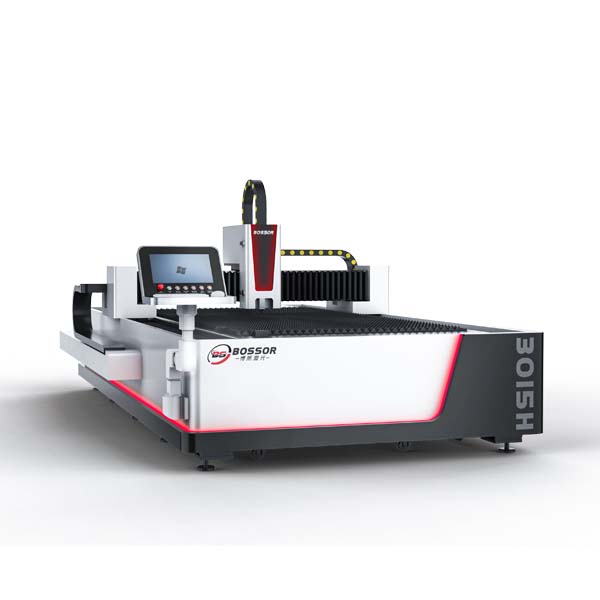
A fiber laser cutting machine is a CNC system that cuts metal with a laser beam generated in a fiber source, delivered through an optical fiber, and focused onto the workpiece by the cutting head. Assist gas blows the molten material out of the cut.
The system includes the laser source, cutting head, motion system, CNC controller, cutting table, chiller, extraction and gas supply. Cut quality is never the product of laser power alone — focus, nozzle condition, gas pressure, machine rigidity and parameter settings all contribute.
1.1 What Materials Can It Cut?
Fiber lasers are built for metal: carbon steel, stainless steel, aluminium, brass, copper, galvanised sheet, titanium and various alloys. The wavelength is absorbed well by metals, so reflective materials such as aluminium and copper are handled comfortably when the machine is specified with a suitable source, cutting head and back-reflection protection.
Behaviour changes with grade, coating and surface finish — polished stainless is harder to cut than plain mild steel at the same thickness. Confirm your actual grades, not a generic capacity chart.
1.2 Fiber Laser vs. CO2 Laser
For metal work, fiber is the default: faster on thin sheet, more energy-efficient, no mirror alignment, and comfortable with reflective metals. CO2 remains the right technology for acrylic, wood, MDF, leather, fabric and paper.
The practical rule is to buy for the material family that drives most of your recurring revenue or outsourcing spend. A higher-power fiber laser will not solve an acrylic problem, and a CO2 machine will not solve a stainless steel one.
2. Define Your Cutting Requirements
Everything downstream — power, table, automation, budget — comes from one short requirements sheet. Build it before you contact suppliers, and base it on weekly reality rather than exceptions.
2.1 Material and Thickness
For every metal you process regularly, record:
- Typical production thickness (what you cut most days)
- Maximum routine thickness
- Grade, coating and surface condition
- Approximate monthly volume
The gap between typical and maximum decides more of your budget than any other figure. If 85% of your work sits between 1 mm and 6 mm and 3% is 20 mm plate, specifying around the 20 mm job will cost far more than subcontracting it.
2.2 Sheet and Part Dimensions
Note the sheet formats your steel supplier delivers and the largest part you produce regularly. Then confirm usable cutting area (not overall table size), nesting and clamping allowance, whether tube or formed parts are involved, and how remnants will be handled.
2.3 Cut Quality and Tolerance
Turn customer expectations into measurable criteria: dimensional tolerance, repeatability, acceptable kerf and roughness, dross and heat tint limits, small-hole quality, and whether parts move straight to welding, bending or coating.
Published positioning accuracy describes machine motion, not finished parts. Real part accuracy also depends on material stress, thermal input and parameters.
2.4 Production Volume
Estimate sheets or parts per shift, batch sizes, job changes per day, operating hours and operator availability. Then separate cutting time from non-cutting time — loading, unloading, programming, piercing and material changes. In many shops that figure decides the machine configuration more than laser power does.
3. Choose the Right Machine Configuration
Configuration affects output as much as power. The decision usually comes down to how much of your day is lost to material handling.
3.1 Single-Table Fiber Laser
The practical starting point for most small and mid-sized fabricators. The operator programs the next job while the current sheet cuts, and the machine is simpler to access, operate and maintain. Best when material changes are infrequent, batches are reasonably long, or budget and floor space are tight. The trade-off is straightforward: the beam stops during loading and unloading.
3.2 Exchange-Table Fiber Laser
Two pallets — one cuts while the other is unloaded and reloaded. The benefit is not cutting speed; it is recovered beam time.
Do the arithmetic before deciding. If you change sheets 30 times per shift and each change costs three minutes of cutting, you are losing roughly 90 minutes of production every shift. Compare that recovered time, over three to five years, against the price difference.
3.3 Sheet-and-Tube Machine
A combined machine removes transfers between separate machines, but only earns its place if tube work is genuinely recurring. Before ordering, confirm supported diameter, length, weight and profile shapes, chuck capacity, loading method, remnant length, and achievable accuracy on tube rather than sheet. If tube jobs are occasional and can be outsourced economically, a sheet-only machine will deliver better utilisation.
3.4 Specialized Fiber Laser Systems
Dedicated tube lasers suit manufacturers where tube and profile processing is a core product line with sustained volume. They offer faster loading, better remnant control and higher tube accuracy than a combination machine, but are hard to justify for occasional work.
3D and robotic laser systems cut formed components, curved surfaces and trimmed pressings. They require significantly more programming and fixturing capability and should be treated as application-specific investments, not a default upgrade.
4. How Much Laser Power Do You Need?
This is where buyers overspend most often. Required power depends on material, grade, thickness, assist gas, target speed and the edge quality you must deliver.
Start from your production profile rather than a single thickness figure:
| Defect | Possible Causes | Checks and Corrective Actions |
|---|---|---|
| Cracking during bending | V-opening too narrow; punch radius too small; low material ductility; unfavorable grain direction | Verify material grade and grain direction; review punch radius and V-opening; confirm tonnage and minimum flange limits |
| Angle inconsistency | Tool wear; incorrect crowning; holder misalignment; material-thickness variation | Inspect and align tooling; verify holder condition and crowning; measure material thickness along the bend |
| Surface marks | Contaminated tooling; sharp contact edges; unsuitable contact pressure; sensitive coated surface | Clean and inspect tooling; consider protective film, polished radii, or suitable mark-reducing tooling |
| Excessive springback | Material strength variation; unsuitable bend method; incorrect stroke or tool geometry | Verify material data; review stroke depth, punch radius, die opening, and bending method; perform a controlled test bend |
The correct power is determined by your most common production range, not the thickest sheet you may cut once a month.
Higher power buys speed and thick-section capability, but it also raises purchase price, electrical demand, gas consumption, chiller capacity and process-control demands. Size around routine work, add a modest margin for growth you can actually forecast — commonly 20–30% headroom — and confirm the choice with timed sample cuts on your own material.
4.1 Production Thickness vs. Maximum Thickness
This distinction saves more money than any other point in this guide.
Максимальная толщина means the machine can complete the cut under favourable conditions. Production thickness means it can do so repeatedly, at an acceptable speed, with edge quality your customer accepts, without excessive pierce time or consumable wear.
Ask every supplier for both figures — then request samples at the thickest gauge you run regularly, not at their maximum.
4.2 How Assist Gas Affects Cutting
Assist gas is a major quality and cost variable that rarely appears in machine comparisons.
- Oxygen — generally faster on thicker carbon steel; leaves an oxidised edge
- Nitrogen — clean, oxide-free edges on stainless and aluminium; higher consumption and cost
- Compressed air — lowest gas cost; requires clean, dry, well-regulated air and suits selected materials and thicknesses
Gas choice affects speed, edge appearance, downstream processing and running cost. Budget for cylinders or a generator, piping, regulators, pressure, purity and compressor capacity as part of the project — not afterwards.
5. How to Choose the Right Bed Size
Bed size should match the sheets you buy and the largest part you cut regularly, with margin for nesting and positioning.
Before deciding, confirm usable cutting area, compare it against your standard sheet formats, allow space for clamps and safe unloading, and check the total footprint including chiller, extraction and service clearance. Verify floor loading and delivery access at the same time.
Oversizing costs floor space and capital. Undersizing costs setups, pre-cutting and scrap.
5.1 Understanding 3015, 4020 and 6020
Model numbers usually refer to working-area dimensions, though naming conventions vary between manufacturers:
| Common Format | Typically Refers To | Often Suits |
|---|---|---|
| 1530 / 3015 | Approx. 1500 × 3000 mm | General sheet metal fabrication, standard stock sizes |
| 2040 / 4020 | Approx. 2000 × 4000 mm | Larger sheets, higher-volume production |
| 2060 / 6020 | Approx. 2000 × 6000 mm | Long panels, structural and architectural work |
| 4015 | Approx. 1500 × 4000 mm | Longer parts on standard-width stock |
Treat these as broad conventions and always confirm actual dimensions on the quotation. Don't choose a model number by size alone — compare usable cutting area, your real sheet format, loading method and factory footprint.
6. How to Read a Fiber Laser Machine Specification Sheet
Most quotations arrive as a list of numbers. This table translates them into the questions that matter.
| Спецификация | What It Means | What to Ask the Supplier |
|---|---|---|
| Мощность лазера | Cutting capacity and speed potential | What thickness is economical, not just possible? |
| Working area | Maximum sheet processing area | Is this the usable cutting area? |
| Positioning accuracy | How closely an axis reaches a commanded position | How and under what conditions was it measured? |
| Repeatability | Consistency of returning to a position | Can you demonstrate repeated parts across a full sheet? |
| Max cutting speed | Peak motion capability | What is the cycle time on my nested file? |
| Acceleration | Dynamic performance | How does it behave on small holes and tight contours? |
| Laser source | Beam generation system | Warranty term, service route, replacement cost? |
| Cutting head | Focus and beam delivery | Autofocus? Collision and back-reflection protection? |
| Система управления | Programming and process management | Which licences and modules are included? |
| Table/configuration | Material handling method | What is the exchange time in practice? |
A specification sheet is a screening tool. Every figure on it should be converted into a question, and the important ones should be verified by sample cutting.
7. How to Compare Real Cutting Performance
Datasheets describe potential; production results describe value. Hold everything constant except the machine — same material, thickness, CAD file, nesting, gas and quality standard — then measure accepted parts per hour.
7.1 Cutting Speed and Acceleration
Maximum traverse speed is a poor predictor of output on real parts. Tight contours, small holes, frequent piercing and short moves mean acceleration and control tuning often matter more. Ask for a cutting-time comparison on the same nested file, including pierce strategy.
7.2 Accuracy and Repeatability
Accuracy is how closely the machine reaches a commanded position; repeatability is how consistently it returns to it. Both matter when parts must interchange across batches. Measure several identical parts from the same nest, and repeat across a full sheet to expose thermal drift.
7.3 Edge and Hole Quality
Inspect the features that cause downstream problems: small holes, narrow slots, sharp internal corners, long contours and thick-section pierce points. Check dross, taper, roughness, heat tint and consistency across the sheet. Any grinding or deburring the parts require belongs in your cost-per-part calculation.
7.4 What to Measure During a Machine Test
When you attend a demonstration, record these eight items for every machine on the shortlist:
- Total cycle time on your nested file
- Number of pierces and pierce time
- Assist gas type, pressure and consumption
- Measured part accuracy against drawing tolerance
- Small-hole and slot quality
- Dross and edge finish
- Operator interventions required during the run
- Rejected or reworked parts
Consistent measurement across suppliers is what turns a demonstration into evidence.
8. Machine Structure and Key Components
Long-term accuracy depends on engineering as a system, not on which brand names appear in the quotation.
8.1 Laser Source and Cutting Head
Confirm rated power, warranty term, service route and replacement cost for the source. For the cutting head, check autofocus range, protective optics, collision protection and back-reflection handling. Ask who handles a warranty claim when the fault sits with a third-party component.
8.2 Frame, Gantry and Motion System
Evaluate frame construction and wall thickness, internal reinforcement, stress relief after welding, gantry rigidity and weight, linear guides, racks, servo drives and automatic lubrication.
A machine with premium servos on an under-engineered frame will lose accuracy under continuous load. Ask how the structure controls vibration during rapid traverse and which critical parts are held in local stock.
9. How Much Does a Fiber Laser Cutting Machine Cost?
Prices for fiber laser cutting machines vary widely — often by a factor of several times between two machines that look similar in a catalogue. Understanding why is more useful than any single price range, because it lets you judge whether a quotation is competitive for the configuration you actually need.
9.1 What Affects the Price?
| Cost Factor | Why It Changes the Price |
|---|---|
| Мощность лазера | Higher power generally increases equipment cost significantly |
| Bed size | Larger working areas require a bigger frame, motion system and enclosure |
| Machine configuration | Exchange tables and pallet changers add mechanical complexity |
| Laser source | Source brand, specification and warranty terms affect cost |
| Cutting head | Autofocus, higher power ratings and advanced protection add cost |
| Автоматизация | Loading, unloading, towers and sorting can increase investment substantially |
| Tube capability | Combined sheet-and-tube systems cost more than sheet-only machines |
| Control and software | Licences, nesting modules and support packages vary between suppliers |
| Auxiliary equipment | Chiller, extraction, gas generation and compressors may be quoted separately |
| Delivery and installation | Freight, rigging, installation, commissioning and training may be excluded |
Two quotations can differ by 30% purely because one includes extraction, a gas generator, software licences and training while the other does not. Always normalise before comparing.
Don't compare fiber laser machines by purchase price alone. Compare the total cost of producing an accepted part.
9.2 Total Cost of Ownership
| Cost Category | Include |
|---|---|
| Acquisition | Machine, options, freight, duties, installation, commissioning, training |
| Facility | Electrical work, gas installation, extraction, foundation, floor space |
| Энергия | Laser source, chiller, extraction, compressor |
| Consumables | Nozzles, protective windows, lenses, filters, lubrication |
| Process gas | Oxygen, nitrogen or compressed air generation |
| Software | Licences, updates, support contracts |
| Техническое обслуживание | Preventive service, spare parts, technician visits |
| Labour | Operators, programmers, material handling |
| Risk | Scrap, rework, planned and unplanned downtime |
A structured preventive maintenance schedule reduces consumable wear and unplanned downtime, and is usually far cheaper than emergency repair.
9.3 Cost Per Accepted Part
Divide your annual total cost by realistic annual output — after scrap and rework. That figure, not the invoice price, tells you which machine is cheaper. A more expensive machine that runs faster, holds tolerance and needs less rework frequently wins on cost per part within the first two years.
9.4 Building a Realistic ROI Estimate
Compare your current outsourcing or legacy equipment costs against projected in-house costs, using honest assumptions: realistic utilisation rather than continuous cutting, actual yield, and full labour, gas, energy, maintenance and financing.
Run three scenarios — conservative, expected and high demand. If the investment only works in the optimistic case, the specification needs revisiting. Leasing and loans can improve cash flow, but financing should never justify a machine that doesn't fit the workload.
10. How Much Automation Do You Need?
Automation ranges from automatic focus and nozzle changing to load/unload systems, sheet towers, part sorting and production monitoring.
It pays off when volume is sustained, batches are reasonably long, loading and unloading limit utilisation, you run multiple shifts, or skilled operators are hard to find.
It's harder to justify when work is high-mix and low-volume with constant job changes, material sizes change frequently, or floor space and maintenance capability are limited.
Attach a number to every automated feature: labour hours saved and cutting hours gained, against added capital, maintenance and complexity.
11. Factory and Installation Requirements
Confirm these before ordering, not after delivery:
- Electrical — voltage, phase, connected load, stability, grounding
- Cooling — chiller capacity, water quality, ambient temperature limits
- Assist gas — supply method, pressure, purity, piping, storage
- Compressed air — compressor capacity, drying, filtration
- Extraction — airflow, ducting, filtration, exhaust routing
- Floor — load capacity, flatness, foundation requirements
- Space — footprint, service clearance, material flow, unloading area
- Logistics — delivery access, rigging, installation, commissioning
Request a written installation requirement document and clarify exactly what is included in the quotation.
12.Safety Features to Check
Once the specification is settled, the remaining risk is service. Downtime on a laser cutter stops an entire fabrication line.
12.1 Sample Cutting Test
The sample cut is the most reliable pre-purchase evidence available.
- Supply your own material and CAD files
- Include routine parts и your most difficult features
- Agree acceptance criteria in writing beforehand
- Record cycle time, gas, pressure and parameters
- Measure several repeated parts, not one showpiece
- Keep the samples to compare against production output later
Do not accept supplier-selected demonstration parts as proof of capability.
12.2 Installation and Training
Define who installs and commissions the machine, how long training lasts, who attends, whether training uses your own parts and materials, and what documentation and parameter libraries are handed over.
12.3 Spare Parts and Service Response
Confirm where spare parts are stocked, normal lead times, which consumables you should hold, remote diagnostics capability, typical on-site response time, warranty exclusions, and post-warranty support.
A capable supplier explains why a configuration suits your workload. A weak one simply recommends the highest specification you will approve.
13.How to Evaluate the Manufacturer and Supplier
Step 1 — Send one identical brief. Materials, thicknesses, sheet sizes, representative CAD files, tolerances, monthly volumes, available utilities.
Step 2 — Require an itemised quotation. Machine, source, options, software licences, chiller, extraction, gas equipment, automation, installation, training, warranty and exclusions listed separately.
Step 3 — Normalise. Add the cost of anything one supplier excludes and another includes.
Step 4 — Score, don't guess. Weight production fit, sample quality, demonstrated cycle time, total ownership cost, service capability and implementation risk.
13.How to Evaluate the Manufacturer and Supplier
Once the specification is settled, the remaining risk is service. Downtime on a laser cutter stops an entire fabrication line.
13.1 Sample Cutting Test
The sample cut is the most reliable pre-purchase evidence available.
- Supply your own material and CAD files
- Include routine parts и your most difficult features
- Agree acceptance criteria in writing beforehand
- Record cycle time, gas, pressure and parameters
- Measure several repeated parts, not one showpiece
- Keep the samples to compare against production output later
Do not accept supplier-selected demonstration parts as proof of capability.
13.2 Installation and Training
Define who installs and commissions the machine, how long training lasts, who attends, whether training uses your own parts and materials, and what documentation and parameter libraries are handed over.
13.3 Spare Parts and Service Response
Confirm where spare parts are stocked, normal lead times, which consumables you should hold, remote diagnostics capability, typical on-site response time, warranty exclusions, and post-warranty support.
A capable supplier explains why a configuration suits your workload. A weak one simply recommends the highest specification you will approve.
14. How to Compare Supplier Quotes
Step 1 — Send one identical brief. Materials, thicknesses, sheet sizes, representative CAD files, tolerances, monthly volumes, available utilities.
Step 2 — Require an itemised quotation. Machine, source, options, software licences, chiller, extraction, gas equipment, automation, installation, training, warranty and exclusions listed separately.
Step 3 — Normalise. Add the cost of anything one supplier excludes and another includes.
Step 4 — Score, don't guess. Weight production fit, sample quality, demonstrated cycle time, total ownership cost, service capability and implementation risk.
15.Fiber Laser Cutting Machine Buying Checklist
Before requesting quotations
- List all materials processed regularly
- Record routine production thickness for each
- Record maximum routine thickness
- List standard sheet sizes and largest regular part
- Define tolerance and edge-quality requirements
- Estimate monthly production volume and shift pattern
- Prepare representative CAD files
- Document available power, gas and floor space
Before machine testing
- Supply your own material
- Supply your own CAD files
- Include your most difficult features
- Measure full cycle time
- Check edge and hole quality
- Verify repeatability across a full sheet
- Record gas consumption and operator interventions
Before signing the order
- Confirm every included component and licence
- Confirm installation and utility requirements
- Confirm warranty scope and exclusions
- Confirm spare parts stock and lead times
- Confirm service response time
- Confirm training scope and documentation
- Confirm delivery, commissioning and payment schedule
16. Common Buying Mistakes
- Buying maximum power instead of matching routine thickness
- Sizing the bed for a rare job rather than regular stock
- Comparing top speed instead of complete cycle time
- Treating maximum thickness as economical production thickness
- Assuming brand-name components guarantee overall machine quality
- Leaving gas, electrical, cooling and extraction out of the budget
- Underestimating loading, unloading and non-cutting time
- Over-automating a high-mix, low-volume shop
- Skipping sample cuts on your own files and materials
- Comparing purchase price without service risk and downtime cost
17.FAQ
Q1:How much does a fiber laser cutting machine cost?
Price depends mainly on laser power, bed size, table configuration, automation and what auxiliary equipment is included. Two similar-looking quotes can differ substantially because one includes extraction, gas equipment, software and training. Always request an itemised quotation and compare on the same scope.
Q2:What size fiber laser cutting machine do I need?
Match the usable cutting area to the sheet format you buy most often and the largest part you cut regularly, with margin for nesting and clamping. A 1500 × 3000 mm class machine suits many general fabricators because it matches common stock sizes.
Q3:What laser power do I need?
It depends on material, grade, thickness, assist gas and required edge quality. Size around the thickness you cut most days, add a modest margin for growth, and confirm with a timed sample cut on your own material rather than relying on a capacity chart.
Q4:Is a fiber laser better than a CO2 laser for metal?
For metal cutting, generally yes — faster on thin sheet, more energy-efficient, no mirror alignment, and capable with reflective metals such as aluminium and copper. CO2 remains the better choice for acrylic, wood and other non-metals.
Q5:Do I need an exchange table?
Choose one when loading and unloading consume a meaningful share of your shift. Multiply the cutting minutes lost per sheet change by changes per shift, then compare the recovered production time against the price difference.
Q6:What gas should I use for fiber laser cutting?
Oxygen is generally used for thicker carbon steel, nitrogen for oxide-free edges on stainless and aluminium, and compressed air to reduce gas cost on suitable materials and thicknesses. Test all viable options on your own parts, since gas is both a quality and a running-cost decision.
Q7:How much does a fiber laser cost to operate?
Budget for electricity, assist gas or compressed air, cooling, extraction, consumables such as nozzles and protective windows, filters, software support, preventive maintenance, spare parts, operator labour and downtime. Compare machines on cost per accepted part under your real duty cycle.
Q8:How should I test a fiber laser before buying?
Send your own material and CAD files, include your hardest features, agree acceptance criteria in advance, and record cycle time, gas consumption, measured accuracy, edge quality, repeatability and operator interventions. Test every shortlisted machine the same way.
18. Conclusion
Choosing a fiber laser cutting machine is a production decision before it is a purchasing decision. The specification should come from your parts, not from a brochure.
Carry these into your next supplier conversation:
- Start with your workload — materials, thicknesses, part sizes, tolerances, volume
- Match the configuration to your workflow, not to the most advanced option offered
- Size power around routine production, not the occasional thick plate
- Separate maximum capability from economical production capability
- Convert every specification into a question, then verify it with sample cuts
- Compare cost per accepted part, not purchase price
- Treat service capability as part of the specification
The practical next step is a one-page requirements sheet covering your materials, thicknesses, sheet sizes, tolerances, monthly volume and available utilities. Send the same document and the same sample files to every supplier on your shortlist. The quality of the responses will tell you who understands your production — and who is simply selling a machine.
If you would like an application review for your specific parts, our engineering team can assess your material mix, recommend a suitable power level and configuration, and arrange a sample cutting test using your own drawings. Contact us to discuss your requirements or request a detailed, itemised quotation.
Stay Updated on Industrial Innovations
Subscribe to our newsletter for the latest insights on manufacturing technology, sustainability, and industry trends.